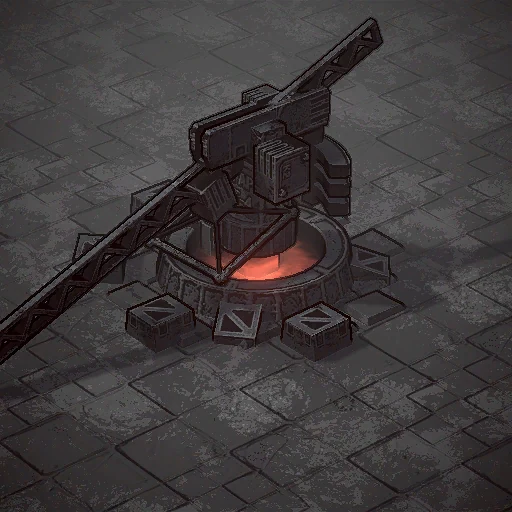
Use the current settings below when comparing this entity. The earlier text and its tactical conclusions remain historical; their values are not assigned to this build.
Adds another building construction queue. Significantly expands the construction area.
Repairs equipment within a small square.
Requirements / Minerals
230
Requirements / Energy
120
Requirements / Gears
50
Requirements / Production time, seconds
40.0
Construction zone / Recorded radius
40.0
Defence / Base hit points
500
Defence / Extra capacity
50
Defence / Front armour
7
Defence / Side and rear armour
7
Defence / Directional armour flag
no
Defence / Fire resistance value
0.9800000190734863
Defence / Gas resistance value
0.8999999761581421
Defence / Area resistance value
0.0
Defence / Total hit-point capacity
550
Supplied upgrades / 1
Repair Expansion
Support / 1 / Amount per support cycle
30
Support / 1 / Cycle, seconds
0.25
Support / 1 / Range
3
Support / 1 / Target type
Vehicles
Production queue
1
Construction links / Main construction / 1
Processing plant
Construction links / Main construction / 2
Supply depot
Construction links / Main construction / 3
Power station
Construction links / Main construction / 4
Construction crane
Construction links / Main construction / 5
Barracks
Construction links / Main construction / 6
Machinery plant
Construction links / Main construction / 7
Foundry
Construction links / Main construction / 8
Complector
Construction links / Main construction / 9
Arsenal
Construction links / Main construction / 10
Radar
Construction links / Additional construction / 1
Trench
Construction links / Additional construction / 2
Turret "AEK-30"
Construction links / Additional construction / 3
Turret "AK-125"
Construction links / Additional construction / 4
Flamethrower turret
Construction links / Additional construction / 5
Bunker
Construction links / Additional construction / 6
Yarus launch silo
Construction links / Additional construction / 7
Mat. Fabricator
Construction links / Additional construction / 8
Silo
Some parameters and links remain uncertain. A missing value here does not establish absence of a game mechanic.
Compare the relevant cost, defence or support settings before applying an older recommendation. File settings do not establish battle results or a guaranteed counter.
Unreadable objects and an unresolved ability link prevent treating this as a complete measurement of every mechanic.
The previous comparison is retained below — build 26004785. The following dates and values belong to their own source.
Revision for the installed demo: Construction crane
Current records — build 26004785
The current records below replace the older values for the same entity. The earlier text is retained separately as a historical version; its numbers and tactical conclusions are not claims about this version.
Adds another building construction queue. Significantly expands the construction area.
Repairs equipment within a small square.
Construction links
Main construction: 1. Processing plant
Main construction: 2. Supply depot
Main construction: 3. Power station
Main construction: 4. Construction crane
Main construction: 5. Barracks
Main construction: 6. Machinery plant
Main construction: 7. Foundry
Main construction: 8. Complector
Main construction: 9. Arsenal
Main construction: 10. Radar
Additional construction: 1. Trench
Additional construction: 2. Turret "AEK-30"
Additional construction: 3. Turret "AK-125"
Additional construction: 4. Flamethrower turret
Additional construction: 5. Bunker
Additional construction: 6. Yarus launch silo
Additional construction: 7. Mat. Fabricator
Additional construction: 8. Silo
Support settings
1. Amount per support cycle: 30
1. Support cycle, seconds: 0.25
1. Range: 3
1. Target type: Vehicles
Construction-zone setting
Recorded radius: 40
The earlier geometric dimensions or changed scene bindings have not been re-established as equivalent measurements. Do not use the older footprint as a placement rule for this version. This uncertainty does not mean the game lacks the feature.
When choosing or using this entity, compare the current settings shown here with the situation in your demo. File values alone do not measure battle results, simultaneous ability activity or a guaranteed counter. Earlier advice that depends on changed values remains historical until checked again.
The historical edition is retained below — build 23882143. Its earlier values must not be carried into the current version.
The historical edition is retained below — build 23882143
The Construction crane costs 230 minerals, 120 energy and 50 gears. Its description says “Adds another building construction queue. Significantly expands the construction area.
Repairs equipment within a small square.” Build 23882143 records 500 base hit points and 7 armour. The linked construction component lists its main and secondary buildings, while a vehicle-healing component is separate from the crane-arm movement ability. That distinction matters: construction access, repair and arm orientation are different functions. Read the crane ability and construction guide before assuming a movement setting changes production speed.
The developer advised players on 15 June 2026 to “move your base” when resources run short. The Construction crane’s description instead names an extra construction queue and an expanded construction area. This gives context for comparing relocation with building reach, but does not make the crane a universal substitute for moving the base. Its linked construction list and vehicle-healing component establish functions beyond the description’s short summary. Read the construction guide alongside the economy guide before choosing where to expand.
Use the extra construction queue when the plan genuinely needs overlapping orders, and place the crane so the expanded area reaches the intended work. The linked component distinguishes main buildings from secondary ones, so verify the desired option rather than assuming every structure is available. Its vehicle repair area can support a protected position, but does not make forward construction safe. Keep access for repaired machines and consider the separate arm-direction command. The construction and repair guides help compare a stationary support point with a mobile BREM.
The mistake is purchasing the crane without a construction or support plan. Its 500 base hit points do not certify survival at the front, and losing a crane may affect several planned roles at once. Protect the routes into its repair area and the construction space you intend to use. When attacking, look at actual queued work and nearby machines before deciding whether the crane is worth the approach. Its location can suggest expansion, but is not proof of the opponent’s next order. Consult the construction guide for its recorded options.
Confirmed Established — fromdocs/sources/demo/raw/BuildConfig.json / r_Crane_Build, build 23882143
Cost
Minerals
230
Energy
120
Gears
50
Build time
40 s
Defence
Hit points
500
Extra hit points
+50
Armour
7
Fire resistance
0.98
Gas resistance
0.9
What it is
The Construction crane costs 230 minerals, 120 energy and 50 gears. Its description says “Adds another building construction queue. Significantly expands the construction area.
Repairs equipment within a small square.” Build 23882143 records 500 base hit points and 7 armour. The linked construction component lists its main and secondary buildings, while a vehicle-healing component is separate from the crane-arm movement ability. That distinction matters: construction access, repair and arm orientation are different functions. Read the crane ability and construction guide before assuming a movement setting changes production speed.
Where it comes from
The developer advised players on 15 June 2026 to “move your base” when resources run short. The Construction crane’s description instead names an extra construction queue and an expanded construction area. This gives context for comparing relocation with building reach, but does not make the crane a universal substitute for moving the base. Its linked construction list and vehicle-healing component establish functions beyond the description’s short summary. Read the construction guide alongside the economy guide before choosing where to expand.
How it is actually used
Use the extra construction queue when the plan genuinely needs overlapping orders, and place the crane so the expanded area reaches the intended work. The linked component distinguishes main buildings from secondary ones, so verify the desired option rather than assuming every structure is available. Its vehicle repair area can support a protected position, but does not make forward construction safe. Keep access for repaired machines and consider the separate arm-direction command. The construction and repair guides help compare a stationary support point with a mobile BREM.
How to beat it
The mistake is purchasing the crane without a construction or support plan. Its 500 base hit points do not certify survival at the front, and losing a crane may affect several planned roles at once. Protect the routes into its repair area and the construction space you intend to use. When attacking, look at actual queued work and nearby machines before deciding whether the crane is worth the approach. Its location can suggest expansion, but is not proof of the opponent’s next order. Consult the construction guide for its recorded options.